

Loading / Đang tải…
Compare detection, previews, Library, download controls and cloud features across free and paid plans, using the October 9, 2026 infographic.
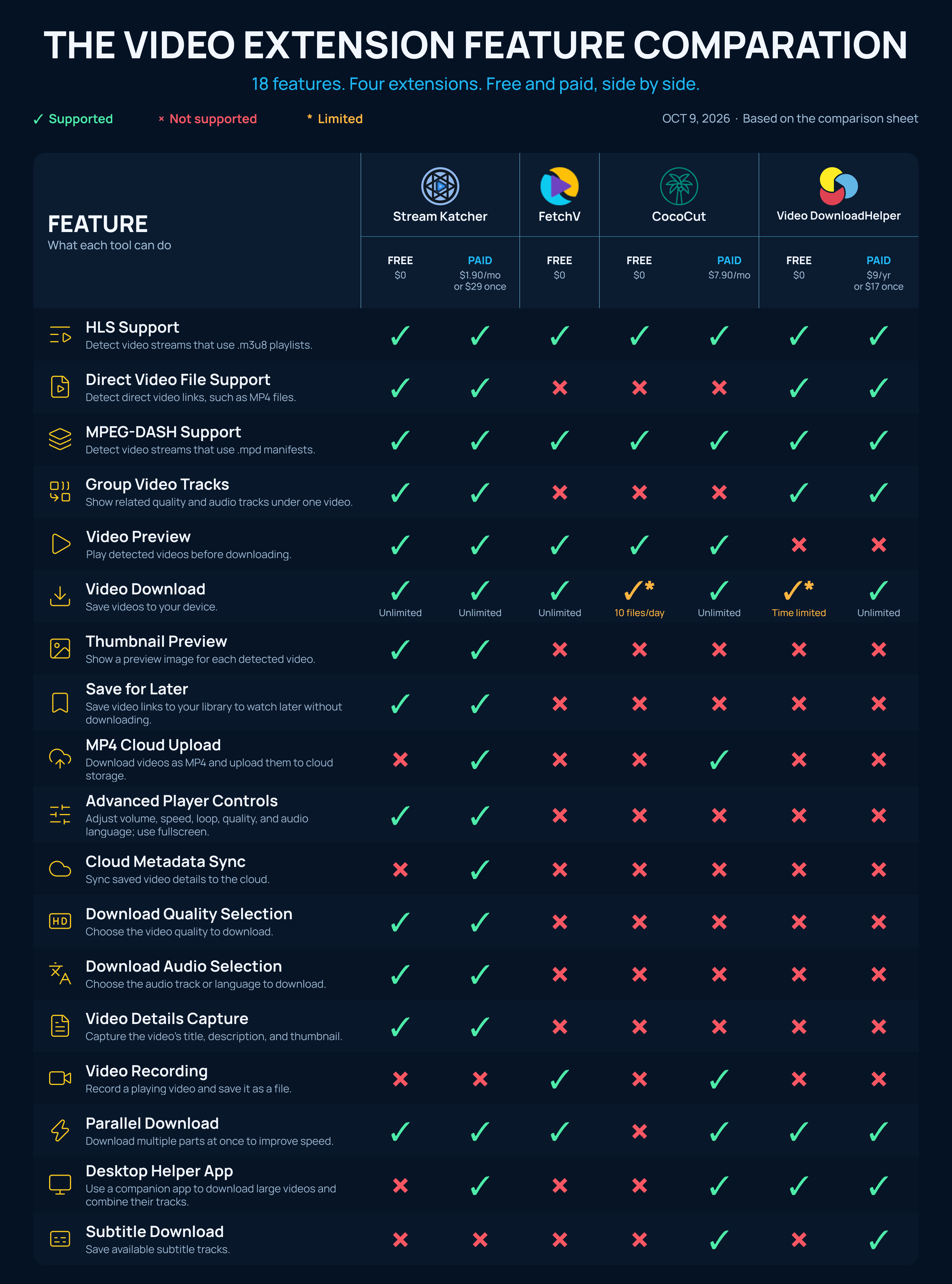
This article interprets the supplied infographic dated October 9, 2026. It compares seven plan columns across four products and 18 capabilities. A check means supported in that sheet, a cross means marked unsupported, and an asterisk means limited. These are dated comparison results, not a new independent test or a promise that every website works. Product versions and the testing method are not specified in the infographic.
HLS and MPEG-DASH are marked supported across all seven columns. Direct video files, such as MP4 links, are marked supported for Stream Katcher and Video DownloadHelper, but not FetchV or CocoCut. Grouping related video and audio tracks is marked supported for Stream Katcher and Video DownloadHelper. For a page exposing multiple qualities or separate audio tracks, grouping can make it easier to understand which entries belong to the same video before downloading.
Stream Katcher, FetchV and CocoCut are marked as having video previews; Video DownloadHelper is not. Thumbnail previews and Save for Later are marked only for Stream Katcher in this sheet, on both free and paid plans. Saving a source link to Library is a different action from downloading a file: it is useful for collecting videos now and choosing what to download later. A saved link can still expire or depend on access to the original website.
The infographic labels downloads unlimited for both Stream Katcher plans, FetchV, CocoCut paid and Video DownloadHelper paid. CocoCut free is limited to 10 files per day; Video DownloadHelper free is time limited, without a precise interval stated. Parallel downloads are marked supported everywhere except CocoCut free. Advanced player controls, download quality selection, download audio selection and video details capture are marked only for Stream Katcher. These controls are especially relevant when the source actually provides multiple qualities or languages; the extension cannot create tracks absent from the source.
MP4 cloud upload is marked for Stream Katcher paid and CocoCut paid. Cloud metadata sync is marked only for Stream Katcher paid. Recording is marked for FetchV and CocoCut paid, while Stream Katcher is marked unsupported. Desktop helper apps are marked for Stream Katcher paid, CocoCut paid and both Video DownloadHelper plans. Subtitle download is marked for CocoCut paid and Video DownloadHelper paid, but not Stream Katcher or FetchV. Recording and downloading a detected media source serve different workflows, so neither should be treated as a substitute without checking your needs.
The sheet lists Stream Katcher paid at $1.90 per month or $29 once; CocoCut paid at $7.90 per month; Video DownloadHelper paid at $9 per year or $17 once. FetchV is shown as free. These figures belong to the October 9 snapshot and do not establish current checkout prices, taxes or license terms. Compare the features you need first, then check the official pricing before purchasing.
Based on this sheet, Stream Katcher stands out for previewing, collecting and organizing videos before downloading, with track selection and richer playback controls. FetchV is worth considering when free downloads and recording matter more than Library or cloud features. CocoCut paid includes recording, cloud upload and subtitles. Video DownloadHelper offers direct-file support and track grouping, with subtitles on the paid plan. Use the platform comparison alongside this feature list: a feature check alone does not prove that a particular source video can be downloaded.
Continue reading: playback and downloads across 17 platforms