

Loading / Đang tải…
See how Video DownloadHelper captures the media source of a playing 14-year-old YouTube video, then Stream Katcher downloads it in Chrome.
Veröffentlicht am
This Chrome case study follows “Local Joey - Danielle Staub On Shout Out Hoboken,” whose YouTube page is labeled “14 years ago.” While the video is playing, Video DownloadHelper captures its active media source (src); Stream Katcher then downloads that selected media as a local copy. The screen recording shows the workflow and a later local playback. The tools have separate roles: capture the playing source with Video DownloadHelper, download it with Stream Katcher.
The page title identifies the clip as “Local Joey - Danielle Staub On Shout Out Hoboken,” and the YouTube page shows the relative age label “14 years ago.” In this workflow, Video DownloadHelper captures the source associated with the playing clip, and Stream Katcher downloads the selected media. Near the end, the recording shows local playback. This documents one browser session; it does not prove that every old YouTube video exposes downloadable media or that the same steps work on other clips.
Play the YouTube video and use Video DownloadHelper to capture the media source (src) associated with the active playback. Match that source to the clip you intend to save, then use Stream Katcher to download the selected media as a local file. The recording shows the detected video and a later screen with the downloaded copy playing. A page may load multiple media items, so confirm the match before downloading. Only save content you have permission to download.
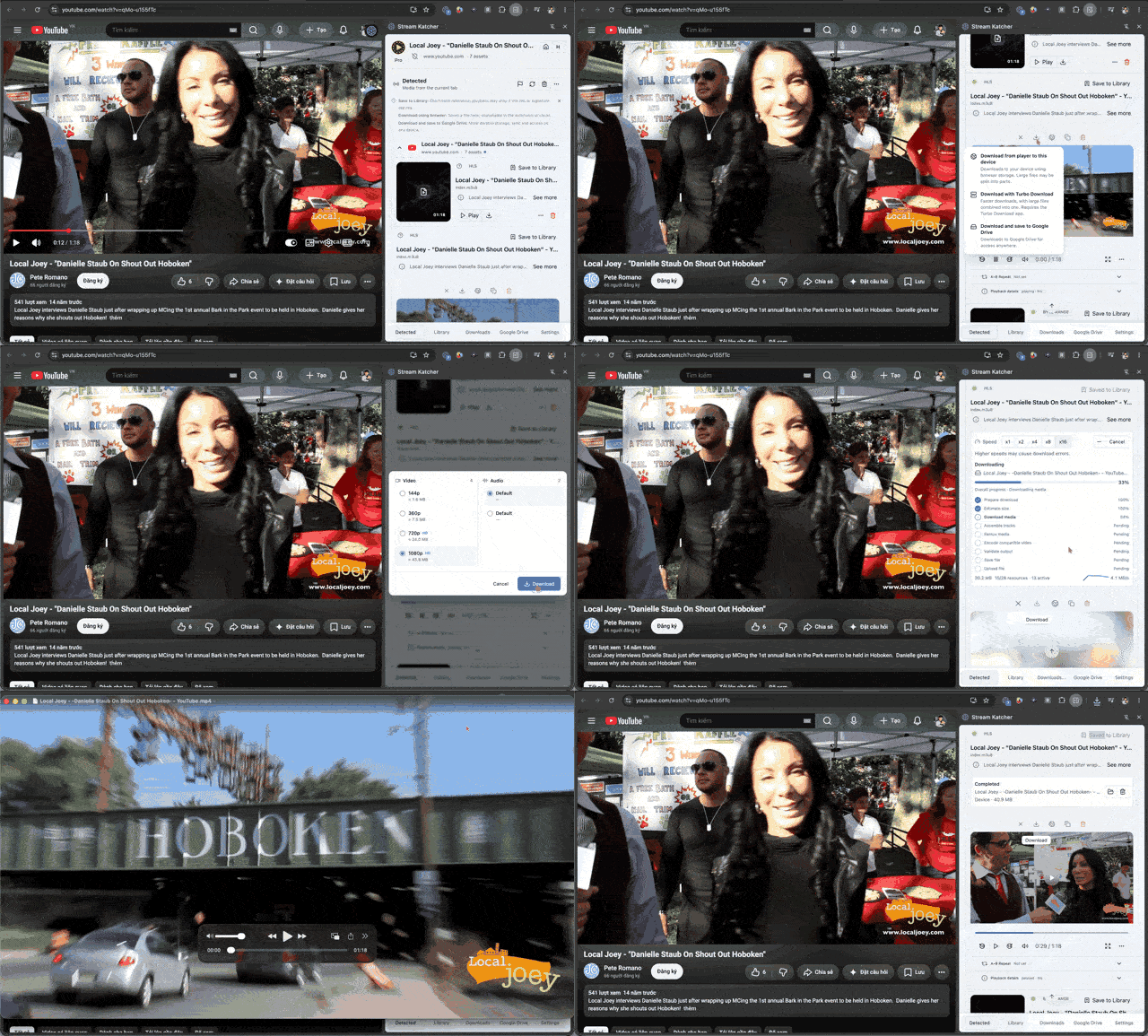
The official Video DownloadHelper FAQ says its Chrome extension does not download YouTube videos. In this workflow, Video DownloadHelper captures the playing source, while Stream Katcher performs the download. The two steps are separate; support can vary by browser, site, and media format.
The article uses YouTube’s embedded player for the original video and the GIF only to illustrate the browser workflow. YouTube’s terms allow displaying videos through its embeddable player and restrict copying or downloading outside the ways it permits, with exceptions defined by permission or applicable law. The age of a video does not change those conditions. Use the official offline option when available, or obtain a source copy and permission from the rights holder.
When you have an authorized local file, play it from beginning to end and check that the audio, duration, and ending are intact. A preview can confirm that a file opens, but it cannot guarantee the complete video was saved. Keep the source link and permission details with your archive so you know where the file came from and how it may be used.
Laden Sie nur Inhalte herunter, deren Eigentümer Sie sind oder die Sie zum Speichern berechtigt haben. Die Unterstützung hängt von der Website und dem Medienformat ab; DRM-geschützte Inhalte werden nicht unterstützt.